 ReUI
Changelog
What’s new
Every release of ReUI, newest first. ReUI checks for the next one once a day and shows these notes after it updates.
0.2.0
2 November 2026
An island on every display, a new clipboard, and a card when a long command finishes.
- An island on every display: Settings → General → Display → All displays. A card that opens by itself opens on the display your pointer is on; a fullscreen game or video hides only the island on its own display. An extra display costs no CPU at rest.
- Where the pointer is now follows the pointer whatever the island is doing (with music playing, a timer running, a card open), and the island emerges on the display it arrives on instead of popping up.
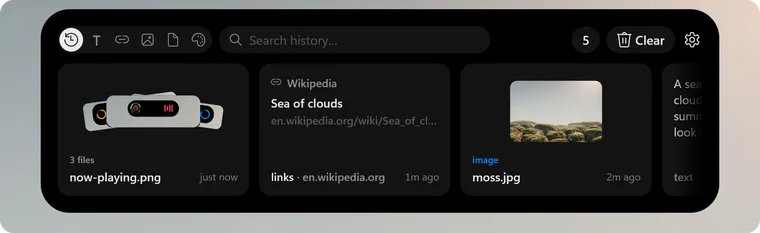
- A new clipboard: one toolbar with the types to show (text, links, images, files, colours), the search, how many cards match, Clear and the settings; wider cards that say what each clip is, its name and when you copied it.
- Files show what Explorer shows for them, fanned out on the card.
- An image copied from a web page keeps its file name, and you can search for it.
- Clear can be undone for 5 seconds.
- Pinned and your collections: click the clock once it's chosen.
- Cards are solid colours, so they look the same on every screen as in a screenshot.
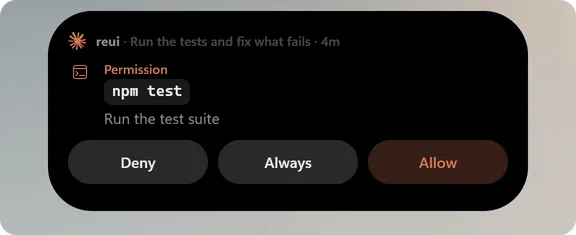
- Long terminal commands: connect PowerShell or Git Bash in Settings → Coding agents. A command that ran 10 seconds or more tells you when it's done or failed, with its exit code and how long it took, if you've moved to another window. Open terminal takes you back.
- Win+Alt+N opens whatever is waiting with the keyboard on it; Esc puts you back where you were typing.
- Hidden from screen shares: people watching your shared screen or a recording don't see your clipboard, an agent's request or a notification on the island. You still do. Settings → General → Screen sharing.
- Send to → ReUI shelf in Explorer's right-click menu holds files on the shelf without dragging them. The installer adds it; a copy you didn't install gets it from Settings → Shelf.
- Coding agents' cards show the full working folder (your home folder as
~), so two sessions of projects with the same name can be told apart. - Settings → General → Start menu entry, to start ReUI again after quitting it.
Fixes:
- With two displays and "Where the pointer is", the island sometimes stayed on one display or didn't show at all.
0.1.0
30 October 2026
First public build.
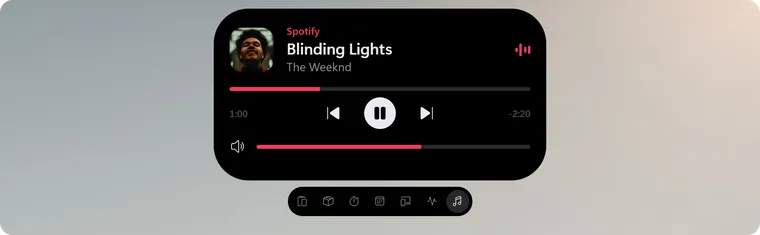
- The island: Now Playing, clipboard history (Win+Alt+V), volume and brightness pop-ups, devices (Bluetooth, batteries, charging, drives), and coding agents (Claude Code, Codex, OpenCode).
- Per-user installer (
ReUI-Setup-0.1.0.exe, no admin): Start menu entry, starts with Windows, uninstall from Apps & features. - Launching ReUI while it runs opens Settings.
- A welcome in three steps on first run: what ReUI shows, your clipboard shortcut, start with Windows. Replay it from Settings → About.
- Settings → Coding agents: connect Claude Code, Codex or OpenCode in two clicks, see when ReUI last heard from each, and send a test event.
- Updates from GitHub releases: a daily check (can be turned off), Install from Settings → About (verified against the release's checksums), and What's new after an update.
- Timers: type how long (
10m tea,1h30) after Win+Ctrl+T, several at once, a finish you can't miss, focus sessions with optional Do Not Disturb, and a stopwatch. They survive sleep and restarts. - Calendar: your next meeting counted down in the island, Join for Teams, Zoom, Meet and Webex links, and the day's card in the row of places. Add Google or Outlook calendars by their secret iCal address (kept encrypted).
- Turn Now Playing, Clipboard history or Devices off entirely (takes effect when ReUI restarts).
- The shelf: drag files, images, links or text onto the island to hold them, then drag them out into any app (files are referred to, never copied or moved).
- Reminders in the same field:
call mom at 6,in 2h check build,every day 21:00 meds, with Snooze and Done; they survive sleep and restarts. - System stats (Win+Alt+S): CPU and memory with their last minute, then GPU, disk and network, read only while the card is open.
- Downloads and screenshots: a download's size and speed while it arrives, then Open and Show in folder; a screenshot's thumbnail the moment you take it.
- Calls in Teams, Zoom, Discord, Slack, Webex, WhatsApp, Telegram or Signal, with their running time and a mute that works in every app.
- Mic, camera and screen in use: the app and a coloured dot, and muting the mic in one click.
- The volume mixer: every playing app with its own level, under the volume pop-up.
- Scripts can show their progress in the island:
reui-bridge activity build --progress 0.42, then--state done. - Appearance: dark, light or following Windows; Island or Notch style; roundness, padding, size and accent.
- Out of your way: open on a click or a rest, hide until something needs you, reveal from the top edge only above the pill, rules per app, and right-click a moment to turn its kind off or snooze it.
- A guide to every feature and shortcut (
docs/guide.md).