 ReUI
Clipboard history
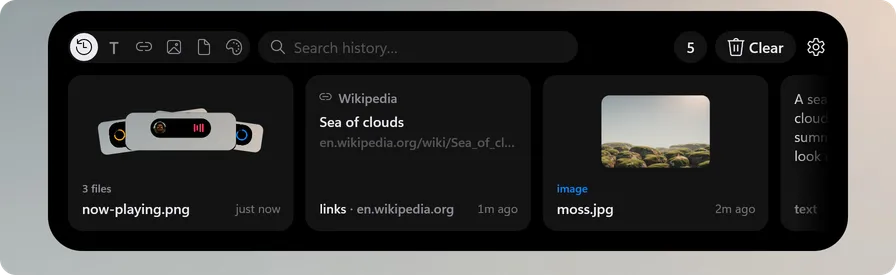
Everything you copy (text with its formatting, images, files) is kept on this PC and comes back as rich cards. Copies from password managers and anything that looks like a secret are never saved. Along the top: the types to show, the search, how many cards match, Clear, and the settings. Files show what Explorer shows for them, and an image copied from a web page keeps its file name, which you can search for.
| Shortcut | It does |
|---|---|
| Win+Alt+V | Opens or closes clipboard history (change it in Settings → Clipboard) |
| Type | Searches |
| ← / → | Selects a card |
| Enter, or click | Pastes into the app you were in |
| Shift+Enter, or Shift+click | Pastes as plain text |
| Ctrl+Enter | Copies only |
| Alt+1 … Alt+9 | Pastes the 1st … 9th card |
| Ctrl+P | Pins or unpins |
| Delete | Deletes (Ctrl+Z brings it back) |
| Tab / Shift+Tab | Next / previous type: All, Text (code too), Links, Images, Files, Colors |
| Click the clock (All) once it's chosen | Chooses what All covers: History, Pinned, or one of your collections |
| Clear at the top | Deletes everything that isn't pinned or in a collection (Undo takes its place for 5 seconds) |
| The gear at the top | Settings → Clipboard |
| Esc | Clears the search, then closes |
| Point at a card | Its star (pin or unpin) and bin (delete; Ctrl+Z brings it back) appear in its corner |
| Right-click a card | Its menu |
| Ctrl+Alt+1 … Ctrl+Alt+9 | Pastes a recent item without opening anything |
If the app you paste into runs as administrator, the item is put on the clipboard and the island says "Press Ctrl+V".