 ReUI
Coding agents
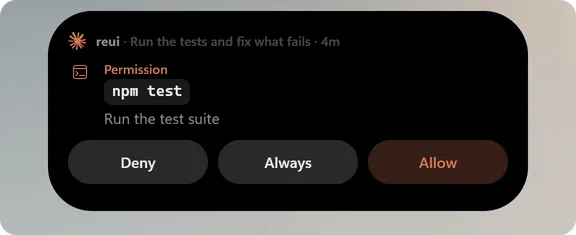
Claude Code, Codex and OpenCode show in the island only when they need you: a permission request you can answer with Allow / Deny (Claude Code and OpenCode also offer Always), a question from Claude Code or OpenCode, a plan or an MCP server's form from Claude Code, a question from Codex to answer in its terminal, or a turn that failed. While they think and run tools, the island stays with your music and timers. Each card starts with a quiet line saying which session it is (the folder it's working in, with your home folder as ~ and a long path shortened in the middle, then what you asked and how long it has been working); a long command or an edit's changed lines show underneath, and the mouse wheel scrolls them. Anything that looks like a password or token shows as dots.
- Deny and say why: Alt+click Deny (or Shift+Enter once the card has the keyboard) opens a field, "Tell Claude what to do instead"; Enter sends it with the deny.
- Questions: click an option to answer. With several to pick, tick them and press Next (the last step says Send); ‹ on the top line goes back with your answers kept. Type in "Type an answer" for something else (OpenCode only offers it when the question allows it). Nothing reaches the agent until the last step. A long list scrolls with the wheel.
- Plans: Approve, or Keep planning to say what should change (Enter sends it to Claude as feedback).
- MCP forms ("Jira (MCP)"): one field at a time: pick from a list, Yes / No, or type into the field and press Enter. Next shows once a required field is filled; the last step says Submit. A number that doesn't read as one says so under the message. Decline says no to the server. A form too complex for the card (lists of things, more than six fields) only offers Answer in terminal.
- MCP links: Open link opens it in your browser and tells Claude it's done; Decline says no.
- Codex questions show with their options, but only Codex's terminal can answer them: Answer in terminal brings that window forward. The card goes once you've answered there. A question asking for a secret shows only its short title.
- Answer in terminal hands it back to the agent's own prompt at once, and brings the window it runs in forward.
- A failed turn says why, with Open terminal beside it; it goes by itself after a while.
- Several at once: one card, oldest first; the pill shows how many, and ‹ › on the top line moves between them.
- Answered in OpenCode itself: the card goes; whichever answer comes first counts.
A card that arrives by itself never takes your keyboard, so a stray Enter in your editor can't allow anything. Click the card to give it the keyboard: ↑ / ↓ move through choices, 1–9 pick one, Space ticks one, Enter answers (on a permission: the tinted button, Allow), Shift+Enter denies with a message, Esc gives the keyboard back. While the card has the keyboard, what you type goes to it, not to your editor.
If Settings → Coding agents says Claude Code's questions need newer hooks, press Update hooks; until then they show with only Answer in terminal.
Settings → Coding agents → Show sessions brings back what they're working on ("While working"), and Finished turns adds a short moment when a turn ends.
Long terminal commands: Settings → Coding agents → Terminals → Connect PowerShell or Git Bash. After that, a command that took 10 seconds or more (a build, a test run, an install) puts a card in the island when it finishes, if you've moved to another window meanwhile: ✓ Done or ✕ Failed, the command, its exit code and how long it took, and Open terminal to go back. A newer command in the same terminal replaces the card; a finished one goes after 5 minutes, a failed one after 30. Nothing shows for a terminal you're looking at. Connect adds a few lines to the end of your PowerShell profile (Documents\PowerShell\profile.ps1, and Windows PowerShell's profile.ps1 if you already have one) or ~/.bashrc; Disconnect takes exactly those out. New terminal windows pick it up. If you use a prompt theme (Oh My Posh, Starship), keep its line above ReUI's in the profile.
Connect an agent in Settings → Coding agents (it shows the file that changes; Disconnect removes exactly what was added). Each agent's row says whether it's connected and when ReUI last heard from it; Send test makes the island confirm the connection. Codex asks you to trust new hooks once: run /hooks in Codex. OpenCode picks the plugin up on its next start; when ReUI updates, it updates the plugin too (restart OpenCode to load it).