 ReUI
Timers
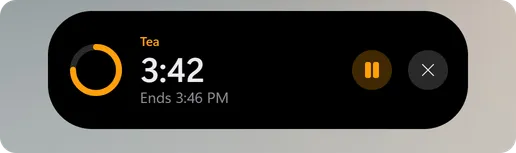
Press Win+Ctrl+T (or Tray → Timer → New timer…) and type how long: 10 (minutes), 10m, 90s, 1h30, 5:00, with a label before or after (10m tea). Enter starts it; the island shows it counting down. Several can run at once; the one ending first is in the pill and the open card pages through the rest. When one ends the island opens with a sound: Stop, or +1 min. Timers keep running through sleep and restarts; one that ended meanwhile is shown quietly as "Finished at …".
Type focus for a focus session (25 minutes of work, 5-minute breaks, a 15-minute break after every fourth); the island asks before each break and before going back to work. Settings → Timers can make it go on by itself and turn on Do Not Disturb while you work. Type sw for a stopwatch, with laps.
reui-bridge timer 10m tea starts one from a script or a coding agent.
Reminders
The timer field takes reminders too. While you type, the card shows when it will fire ("6:00 PM · Call mom"); Enter keeps it.
| Type | Fires |
|---|---|
call mom at 6 |
The next 6 o'clock to come round (18:00 if it's afternoon) |
standup 9:30, at 18:00 take out trash, 6pm call, noon lunch |
At that time, today or else tomorrow |
in 2h check build, in 3 days renew |
That long from now |
tomorrow 9 dentist, fri 3pm review, tonight 9 call |
That day (a bare hour on another day: 7–11 morning, 12–6 afternoon) |
every day 21:00 meds, weekdays 9:30 standup, every monday 10am review |
Again and again |
How 9:30 reads follows your time format: as written in a 24-hour one, the next one round in a 12-hour one. Alone, 5:00 is still a five-minute timer.
When one is due the island opens on it: Snooze (10 minutes) or Done (a repeat moves on to its next time). Several due together share one card. Reminders keep through sleep and restarts; one that came due meanwhile says "Was due at 6:00 PM". With the field empty, the next three are listed under it, and Ctrl+Z removes the one you just added. They make no sound unless Settings → Timers → Sound for reminders is on.